Contents
Everything inside, chapter by chapter.
No feature exists to pad this list. Each one answers a question a novelist actually asks mid-draft, usually at eleven at night, usually about chapter twelve.
Part One
Your story, from every angle.
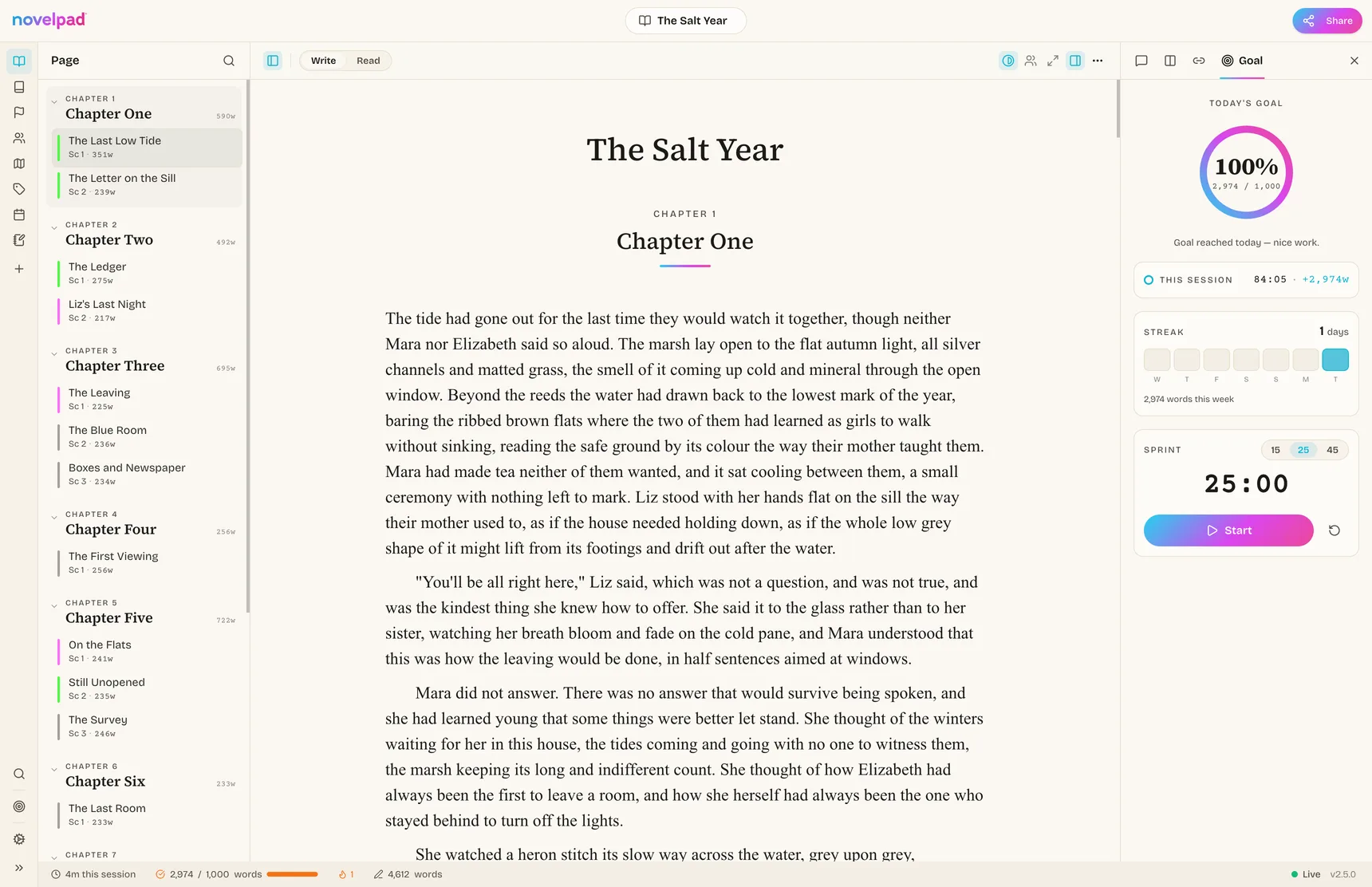
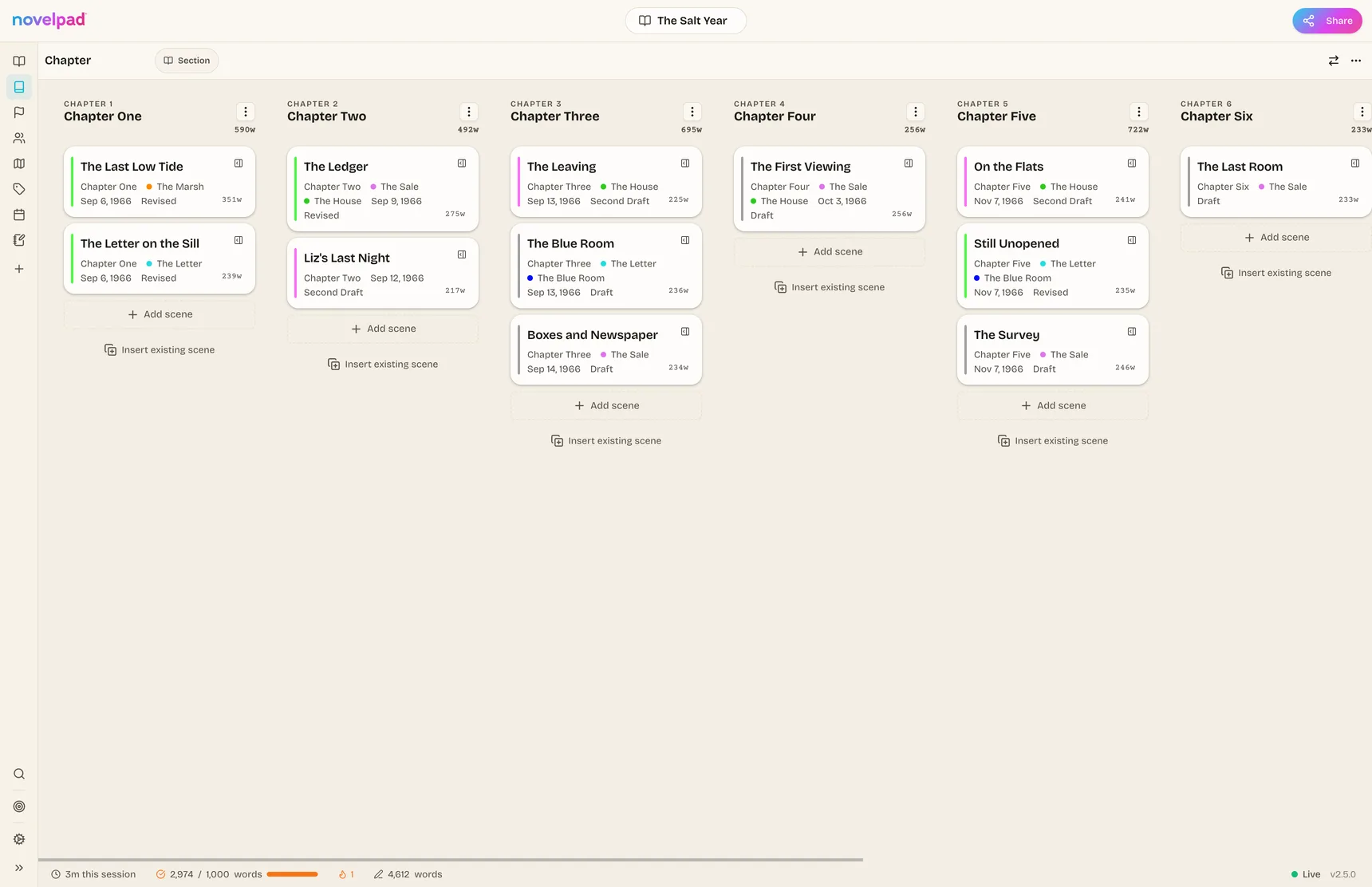
Every board is a different lens over the same scenes. Write once; see it as chapters, as subplots, as a timeline, as a continuous read, with nothing duplicated, and with nothing to keep in sync.
Manuscript board
Your chapters as a drag-and-drop board. Word counts and status on every card; column view for pacing, row view for deep reading.
Plot boards Flex
One scene on many columns at once: a column per subplot, per character arc, per beat sheet. Watch your threads interleave.
Timeline board
Give scenes story-time dates that can differ from chapter order. Verify chronology; build dual or flashback timelines.
Outline board
Unlimited nested hierarchy — Part, Chapter, Scene, Note — when you want the bird’s-eye tree.
Reader view
Mirrors any board’s order and renders its scenes as one continuous, editable flow. Read it the way your reader will.
The scene card
Open any scene and see every placement at once. “Chapter 3, the Revenge arc, June 15,” and reassign from one menu.
Insert from tray
Add an already-written scene to a new board without duplicating it. A badge shows everywhere it lives.
Trash that forgives
Deleted scenes are recoverable and restore to their original positions on every board.
Instant search
Full-text search that runs on your machine and works offline, with ranked, stemmed, phrase queries, scoped or across novels.
Part Two
Characters who keep track of themselves.
Smart Boards & the Codex.
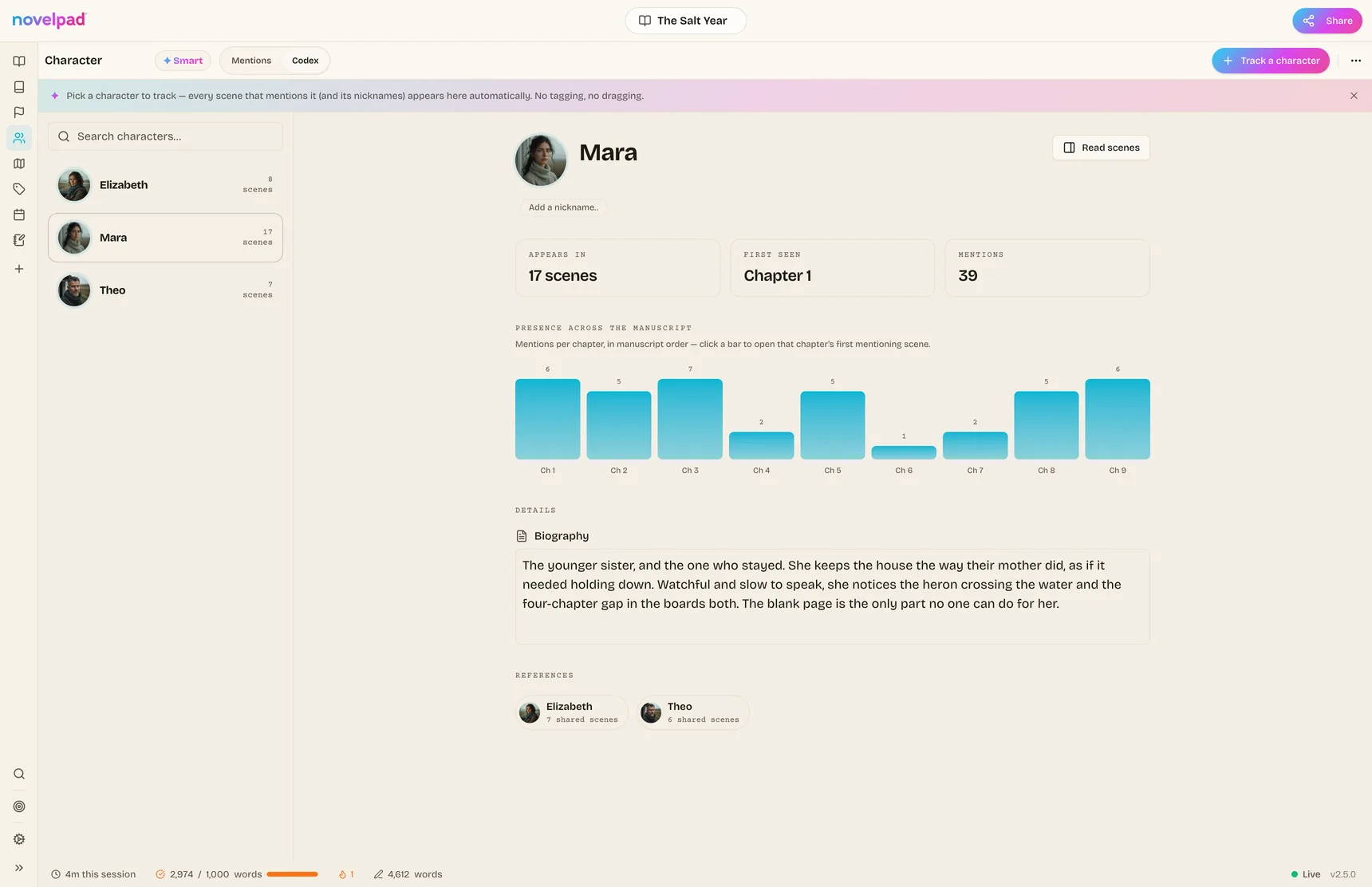
Pick a character, location, or item to track and every scene that mentions it appears on its board automatically, with nicknames included. The Codex adds a profile, aliases, co-mention rankings, and a presence histogram: mentions per chapter, in manuscript order. The moment someone slips out of the story, the gap is visible.
Character profiles
Avatar, role, age, bio, and aliases that feed the auto-matching, so that “Liz” links to Elizabeth.
@-mentions
Type @ in prose to link scenes, characters, locations, boards, even other novels, with typeahead.
Backlinks
The Connections panel shows everything that points here, split into “in the manuscript” vs “in your notes.”
Notebook & story bible
Cross-linked notes for people, places, and lore, with wikilinks and a quick switcher.
Co-mention rankings
Who shares scenes with whom, ranked — useful when a subplot quietly becomes the main plot.
Open anything
One shortcut, one search box, allows you to jump to any scene, note, board, or character without leaving the keyboard.
Part Three
A writing room with the lights just right.
The editor disappears when you’re in flow and helps when you’re not. Four immersion modes, one keystroke away.
Zen, Typewriter, Focus, Highlight.
Zen drops you into fullscreen with no chrome at all. Typewriter keeps your cursor centered on the page. Focus gently fades everything but the passage you’re working on. Line highlight keeps your place on long editing passes.
Typography that respects your locale.
Smart quotes done properly in 20+ locales — English curly quotes, French guillemets, German low-high, Japanese corner brackets — applied automatically as you type. Full RTL support. Your published page deserves better than straight quotes.
Per-novel settings
Each manuscript carries its own typeface, page width, environment, and toolbar. The cozy mystery and the space opera don’t have to share a desk.
A toolbar you curate
Choose exactly which tools float over selected text — whole groups or one by one. Shortcuts always work, even for hidden tools.
Word counts that cascade
Revision → scene → chapter → book, locale-aware (CJK counted correctly), with selection counts in the toolbar.
Part Four
Momentum, engineered.
Goals that adapt when life happens.
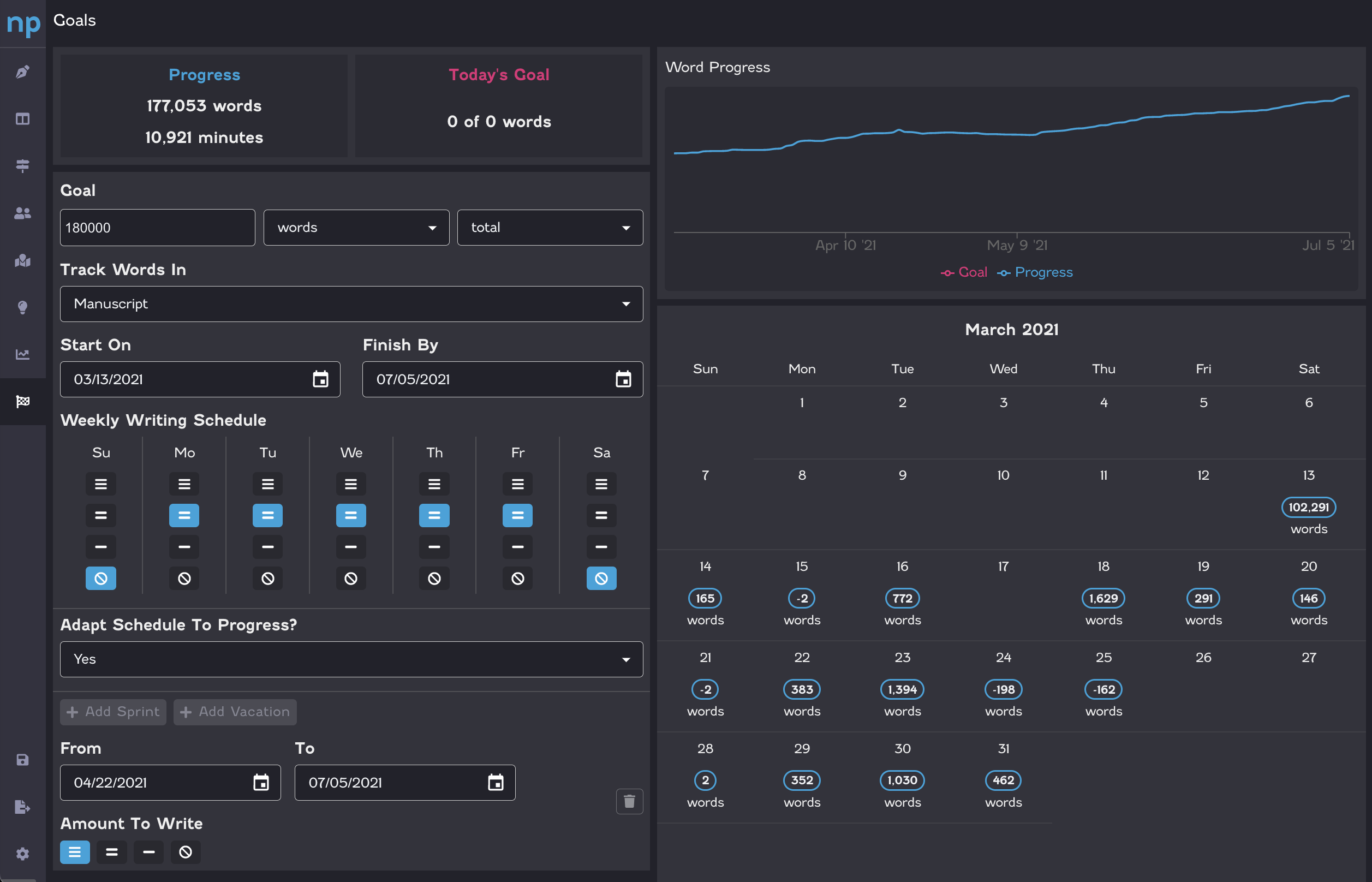
Words, time, scenes, or chapters — daily, weekly, monthly, or by a deadline. Set per-day effort levels, schedule vacations without breaking your streak, and when you miss a Tuesday the remaining work redistributes across future days instead of guilt-tripping you. Sprints are built in for when you need 25 loud minutes.
Part Five
Never lose a word. Not one.
Snapshots
Named, point-in-time versions of the whole novel. Restoring one snapshots the present first, so that even the undo has an undo.
Scene revisions
Keep multiple takes of one scene side by side. Promote, duplicate, and name them as drafts evolve.
Real diffs
Structural and text diffs, formatting-aware, with per-author attribution, so you can see exactly what changed and who changed it.
Offline-first sync
Your novel lives on your machine and syncs across devices when connected. Write through the outage; reconcile later.
No save button
Saving is constant and versioned. Closing the laptop mid-sentence is a save.
Device control
See every signed-in device with live sync status, and revoke one remotely if the old laptop walks away.
Part Six
Easy in. Easy out. No hostages.
DOCX import
Drag a Word file in: headings become chapters, formatting survives — bold, tables, images, footnotes — with a live preview to tune the split.
Per-column export
Export one chapter, one subplot, or one subtree as a clean .docx with a cover page. Send a beta reader just the prologue.
Templates
Built-in and personal starting structures. Clone one and skip the blank-page setup.
Share for feedback
Invite by email with viewer, commenter, or editor roles. Permissions are server-enforced, so a commenter literally cannot alter your prose.
Threaded comments
Inline comment threads with reactions and resolution, so that feedback stays attached to the sentence it’s about.
Desktop + web
Native app on macOS, Windows, and Linux, plus the web app. One account, no lock-in.
The end — of the list